
Blog Article
Strong Signal, Dropped Connection: The Datasheet Spec That Really Predicts Wi-Fi Reliability
Published on Oct 8, 2026 in Thought Leadership
Most dropouts in crowded buildings come from nearby interference. One datasheet spec shows which chips can handle it.
A device passes every bench test. Six weeks after launch, support tickets start: the camera drops offline in apartment buildings, the smart lock takes three tries to respond, and the warehouse sensor’s battery drains far faster than planned.
The usual suspect is range, so the team checks signal strength. Received Signal Strength Indicator (RSSI) looks fine. The access point is two rooms away.
The real problem often isn’t how far away the access point is. It’s how loud the neighbors are.
The 2.4 GHz band is a crowded room
In the US, the 2.4 GHz band has only three non-overlapping 20 MHz Wi-Fi channels. In an apartment building, a dozen or more access points share them, along with Bluetooth, Thread and Zigbee devices, baby monitors and microwave ovens. Factories and warehouses add robots, scanners and industrial sensors.
Much of that traffic sits not on your channel but right next to it. A strong neighboring signal spills energy into yours, and your receiver has to pick out a weak wanted signal beside a loud unwanted one. It’s like hearing a whisper while someone shouts beside you.
A receiver’s ability to do this is called adjacent-channel rejection (ACR). It’s measured in dB: how much stronger the interferer can be than the wanted signal before the packet error rate exceeds the standard’s limit (typically 10%). Higher is better. A negative figure means the receiver fails even when the interferer is weaker.
Why battery-powered devices feel it most
A router can afford to retry. A battery-powered device can’t.
Retransmissions keep the radio on. Every failed packet is sent again, and radio-on time is the biggest battery draw.
The link drops to slower data rates. Rate adaptation steps down from higher-order modulation such as 64-QAM to slower, more robust schemes. The same data can take several times longer to send, exposing each packet to more interference.
Wake windows get missed. Devices using Target Wake Time (TWT) wake only for short, scheduled windows. When interference spoils one, the device stays awake longer or waits for the next, delaying commands.
Video suffers first. A battery-powered camera needs high data rates to move video fast and get its radio back to sleep. We covered this in The Hardest IoT Design Challenge: Always-On Video Without a Power Cord.
In the field, it looks like a range or firmware problem. Often, it’s a receiver problem.
What the datasheets show
Most Wi-Fi IoT chipmakers publish ACR figures, but engineers often glance only at the 1 Mbps number. That’s the easy case: 802.11b at 1 Mbps is a robust, slow mode nearly every chip handles well.
The modes that matter are the fast ones: 802.11n and 802.11ax at MCS7 (64-QAM), where cameras, audio, and firmware updates typically run.
We compared InnoPhase IoT’s Talaria 6 SoCs with published datasheet values for four leading Wi-Fi 6 IoT SoCs.
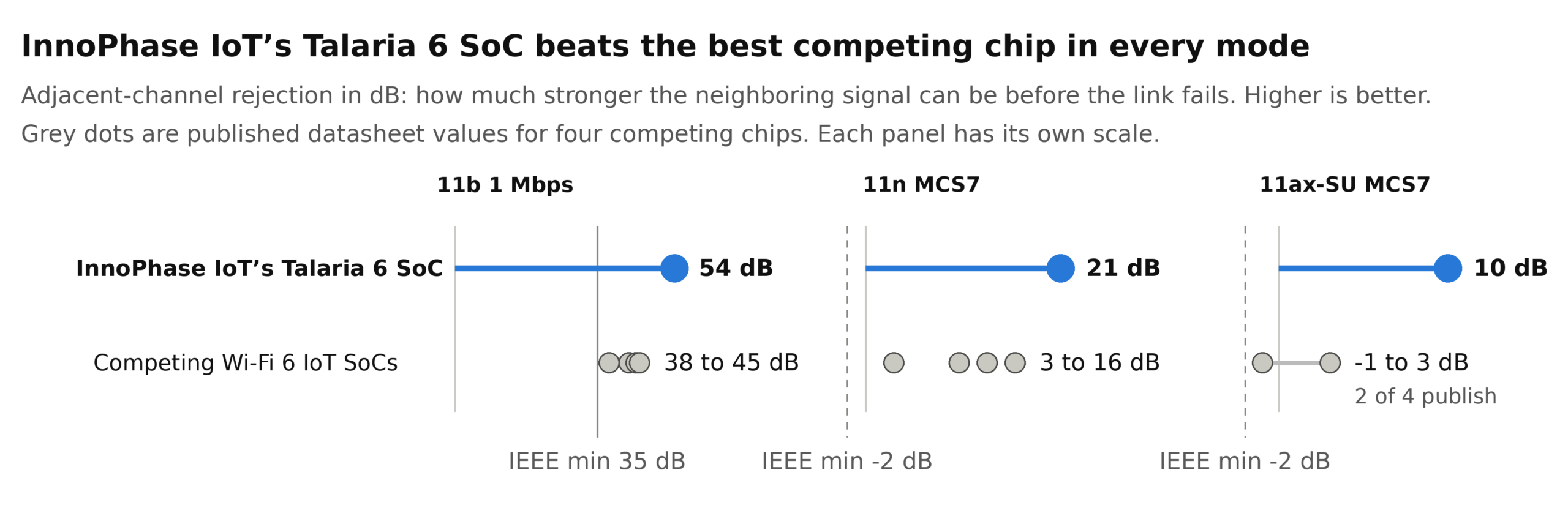
At 11n MCS7, Talaria 6 rejects an adjacent-channel signal 21 dB stronger than the wanted signal. The competing chips publish 3 to 16 dB, against an IEEE 802.11 minimum of −2 dB. Every 3 dB lets the interferer be twice as powerful before the link fails.
At 11ax MCS7, Talaria 6 measures 10 dB. Only two of the four competing chips publish this figure: −1 dB and 3 dB.
Put simply: Talaria 6 leads by 5 to 18 dB at 11n MCS7 and 7 to 11 dB at 11ax MCS7.
How the Talaria 6 family stacks up
The Talaria 6 family (INP6120 and INP6220) was designed around what matters most for battery-powered devices.
| Advantage | What Talaria 6 delivers | Why it matters |
|---|---|---|
| Interference immunity | Ahead of every competing chip we compared, in every mode they publish; 5–18 dB ahead at 11n MCS7 | Fewer retries; higher data rates in crowded bands |
| Standby power | 45–77% lower published standby power than the competing chips we compared | Longer battery life between wake windows |
| RF performance | +3 dB link budget advantage over [competing chips & previous generation] | Holds the link farther from the access point |
| Architecture | Digital radio designed from the ground up for IoT, not derived from a router or mobile radio | Low power and receiver performance built in, not tuned in |
| Integration | Wi-Fi 6, Bluetooth Low Energy (Bluetooth 6.0) and 802.15.4 with an onboard Arm Cortex-M33; runs hostless | One chip instead of two; lower BOM and power |
| Die size | Smallest die in its class | Lower cost, smaller boards |
| Software | Matter, PSA Certified Level 2, FreeRTOS and edge ML; designed to help meet EU Cyber Resilience Act (CRA) requirements | Faster certification and time to market |
| Availability | In volume production today | Ready to design in now |
How to evaluate a Wi-Fi chip for crowded environments
- Read ACR at your product’s actual data rate. A strong 1 Mbps figure says little about 64-QAM.
- Test with an interferer, not just attenuation. A shielded box with one access point hides the problem. Add a stronger signal on a neighboring non-overlapping channel, such as channel 6 when testing on channel 1.
- Count retries in your power budget. Measure average current in a busy RF environment, not a quiet lab.
- Don’t count on external filtering. A board-level filter can’t separate neighboring Wi-Fi channels in the same band, and it adds cost, board space, and insertion loss. The receiver has to do the work.
- Look at how the radio is built. Receiver linearity comes mainly from the architecture, not firmware settings.
Talaria 6: built for the crowded room
Every Wi-Fi IoT chip works in a quiet lab. The real test is an apartment tower on a Friday night or a warehouse floor at shift change.
Talaria 6 uses a digital radio architecture, InnoPhase IoT designed from the ground up for low-power IoT, not scaled down from a router or phone. (We explained why in Built to Scale: Why We Designed the Talaria Platform from the Ground Up.)
The result: fewer dropped connections, fewer retries, longer battery life, and fewer support tickets. Some competing receivers barely clear the standard’s minimum. Talaria 6 exceeds it by a wide margin, and it’s shipping in volume today.
FAQs
What is adjacent-channel rejection?
Adjacent-channel rejection (ACR) measures how well a Wi-Fi receiver picks out a wanted signal when a stronger signal sits on the neighboring channel. It is stated in dB: how much stronger the interferer can be before the packet error rate exceeds the standard’s limit. Higher is better, and a negative figure means the receiver fails even when the interferer is weaker.
Why do connected devices drop Wi-Fi even when signal strength is good?
In crowded 2.4 GHz environments such as apartment buildings and warehouses, strong signals on neighboring channels spill energy into the device’s channel. A receiver with poor adjacent-channel rejection loses packets even when the received signal strength looks fine.
Why does interference hurt battery-powered devices most?
Every failed packet is retransmitted, which keeps the radio on longer. The link also falls back to slower data rates, and scheduled Target Wake Time windows can be missed. Together these drain the battery and delay commands.
Which adjacent-channel rejection figure should I check on a datasheet?
Check the figure at the data rate your product actually uses. For cameras, audio and firmware updates, that is usually 802.11n or 802.11ax at MCS7 (64-QAM). The 1 Mbps figure is an easy case that nearly every chip handles well.
How does Talaria 6 compare on adjacent-channel rejection?
At 802.11n MCS7, Talaria 6 rejects an adjacent-channel signal 21 dB stronger than the wanted signal, compared with 3 to 16 dB published for four leading Wi-Fi 6 IoT SoCs. At 802.11ax MCS7, Talaria 6 measures 10 dB versus −1 dB and 3 dB for the two competitors that publish the figure.
Can an external filter fix adjacent-channel interference?
No. A board-level filter can’t separate neighboring Wi-Fi channels in the same band, and it adds cost, board space and insertion loss. The receiver itself has to reject the interference.
If your devices are dropping in crowded buildings, talk to our team about testing Talaria 6 in your environment. Download the product brief here.
Source: Talaria 6 figures are InnoPhase IoT bench measurements. Competing-chip figures are typical published datasheet values for four leading Wi-Fi 6 IoT SoCs, as of September 2026.